Handling Files
When it comes to handling files in an API a couple of challenges arise. For a discussion about file upload in (GraphQL) APIs see e.g.: https://www.apollographql.com/blog/backend/file-uploads/file-upload-best-practices/ (opens in a new tab)
ActiveQL handles binary files never directly as part of the API but as references to a document store (e.g. local filesystem).
Per default ActiveQL comes with two possible ways to handle files. These are implementations of the FileHandler class, which also offers an easy way to implement your own handler to store files at any place like Amazon S3, Azure File Storage etc.
1. URL References
This is the default behavior.
You can add attributes of type File to any entity or type definition. This will result in a String field that validates its content to be a valid URL. Clients manage to store (upload) files independently from ActiveQL server and simply provides references (URLs) to this files in the mutation's input. ActiveQL will validate if this is a valid URL and handle this information without further processing. It is in the client's responsibility whether the URL is correct - as with any other data.
Besides the validation, such File attribute is handled as any other String attribute in an entities type, queries, mutations, input or filter.
2. Local Filesystem
This implementation uses the ActiveQL's express server to handle POST and GET requests for files and stores the files in the local filesystem. It creates encrypted URLs for uploading, downloading and deleting files - thus ensuring only clients with sufficient rights can manage or access files.
A client cannot provide or get files through the entities queries and mutations but instead the API will provide the necessary URLs.
This implementation uses the following type File to hold information about a file.
type:
  File:
    url: String
    contentType: String
    size: Int
    deleteUrl: String
You can add attributes of type File to any entity. The File attributes will not be part of the entity's input of filter, but will become part of the query and mutation result for this entity.
Besides the File attribute there will be another field added to query and mutation result for this entity: [attribute_name]_upload. A client can use this URL to upload a file for this attribute.
Example
entity:
  Car:
    brand: String
    license: String
    image: File
Upload File
To upload a file a client would query an entity item and ActiveQL would include an upload url in the result. This url would have the following pattern:
[basePath]/upload/[token]/[expiration]/[list]/[entity]/[id]/[attribute]
Example: http://localhost:4000/upload/2394802387/2398402348/false/Car/923480/image
The client can POST a file to this URL, which is then stored in the local file system and the URI to the file is stored in the entity item.
If the upload url would be valid without any expiration time, a client could store it and use it at a time when it no longer has access (in fact write access) to the entity item. Therefore any upload url includes a timestamp of its expiration. After this time the client must query the entity item again to obtain a new upload url.
You might have also seen the entity id in the URL. In order to prevent a client to guess or manipulate an upload url any url includes a unique token, which is built by the hash of the other parts of the url. Therefor if a client would try to manipulate the expiration or the id the token would no longer be valid and the upload would be prevented.
ActiveQL would only add the upload url if client has the UPDATE permission for the entity item.

Upload multiple Files
If a client would upload a (new) file when there is already an (existing) file, the existing file would be deleted and replaced. If the File attribute as of type list any POST to the upload url will store the file until it is deleted.
Example
entity:
  Car:
    brand: String
    license: String
    image: "[File]"
File names of uploaded files
The client posts the content of a file to the upload url so the file name at the client is not preserved. This is the suggested approach since the file name could contain potential risky parts. The file will be named 1, 2, 3, ... followed by the file extension that is obtained by the content-type of the POST request.
Download Files
The files that are stored in the local filesystem are not simply accessible by a URL pattern. Instead a client has to query the entity item and obtain the download url from the query's result. This URL too has an expiration and token to prevent any client to store the URL and access it when it maybe no longer has READ access to the entity item.
ActiveQL would only add the download url if client has the READ permission for the entity item.
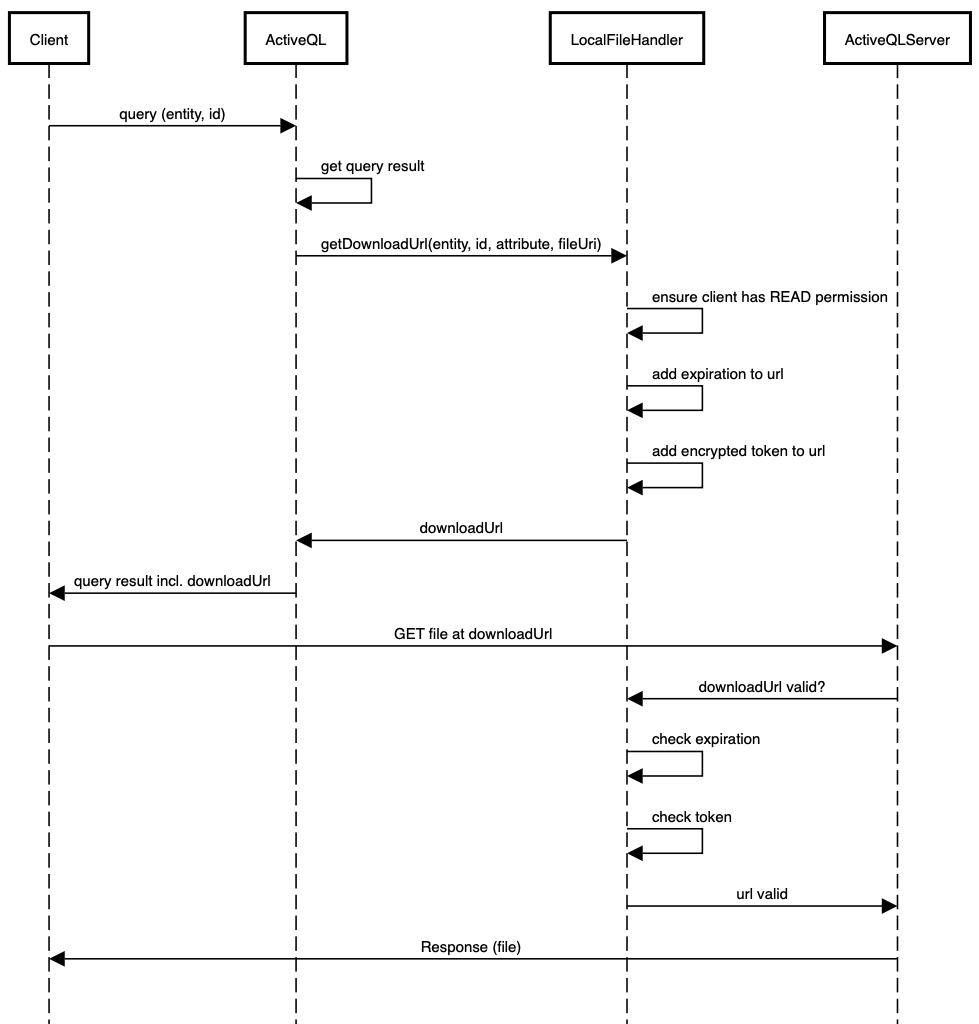
Example
Assuming a client have uploaded an image file to a Car entity item and another would now retrieve this file from the server. This would be the request / response:
query{
  car(id: "zpYqb52") {
    brand
    image {
      url
      contentType
      size
    }
  }
}
{
"data": {
"car": {
"brand": "Audi",
"image": {
"url": "http://localhost:4000/public/52199eea16259abbd5/1689093008116/Car/zpYqb52/image/1.png",
"contentType": "image/png",
"size": 65628
}
}
}
}The client can now download the file at the given url within the expiration period. The information about content-type and fileSize can be used to determine the process of the file at the client.
Deleting files
Beside any download url the client can obtain a delete url. It has the same structure as the download url and allows the client to delete the file and update the entity item.
ActiveQL would only add the delete url if client has the DELETE permission for the entity item.
query($carId: ID!){
  car(id: "zpYqb52") {
    brand
    image {
      url
      deleteUrl
    }
  }
}
{
"data": {
"car": {
"brand": "Audi",
"image": {
"url": "http://localhost:4000/public/a527032cc984a81ede527/1689093841868/Car/zpYqb52/image/1.png",
"deleteUrl": "http://localhost:4000/delete/1aa8bf1bac52bfa8f83/1689093841868/Car/zpYqb52/image/1.png"
}
}
}
}With a GET request to the deleteUrl the client can delete the file and update the entity item accordingly.
Configuring the FileHandler
To add this behavior to an ActiveQL server you must simply provide the runtime-config with a factory method to create an instance of the LocalFileHandler like so:
runtimeConfig.fileHandler = runtime => new LocalFileHandler( runtime );

(async () => {
  const activeql = await ActiveQLServer.create({ runtimeConfig });
  await activeql.start();
})();
This would
- use the default configuration (see below)
- register routes for upload, download and delete of files
- create the type
File - decorate all
Fileattributes with theFiletype - add an
xxx_uploadfield for everyFileattribute of an entity
You can change the default configuration by providing it to the factory method, like so:
runtimeConfig.fileHandler = runtime => new LocalFileHandler(
  runtime, {
    basePath: `http://localhost:4000`,
    rootDir: `${__dirname}/..`,
    expirationInSeconds: 60
  });

(async () => {
  const activeql = await ActiveQLServer.create({ runtimeConfig });
  await activeql.start();
})();| config param | description | default value |
|---|---|---|
| basePath | base path for upload, download and delete urls | http://localhost:4000 (opens in a new tab) |
| rootDir | root dir for storing files in the locale filesystem | ${__dirname}/.. |
| expirationInSeconds | seconds from the creation of an url, the url is considered valid | 60 |
Custom Implementation
As we've seen the file handling behavior is implemented in an instance of FileHandler. So to add a different implementation you have to write your FileHandler implementation and provide its factory method in the runtime-configuration as seen with the LocalFileHandler.