State Engine Tutorial
Sometimes entities have a certain state they maintain over a span of API calls and are affected by and affect a number of mutations. Such behavior can be expressed as EntityStateEngine. This tutorial shows the basics. For more please check the documentation.
State Machine
A state machine models the behavior of a single object, specifying the sequence of transitions that an object goes through during its lifetime in response to events.
A state machine usually consists of:
- States
- Transitions
Example
Let's take the following example. We have three entities, a Car, Driver and a Rental. The latter consists of an assigned Car and Drivers.
entity:
  Car:
    attributes:
      brand: String!
      power: Int!
    seeds: 5

  Driver:
    attributes:
      firstname: String
      lastname: String!
      birthdate: Date!
    seeds: 5

  Rental:
    assocTo: Car!
    assocToMany: Driver
    attributes:
      from: Date!
      till: Date!
States
Let's add the requirement that a Rental can have some kind of state. Adding a state to an entity is as simple as adding a state attribute. A good practice is to use an enum for the attribute type since it adds the possible values of the state to the API's documentation. Therefore we add a state attribute of type RentalState.
According to our assumed business requirements we define the following possible state values:
- requested the Rental was created
- confirmed the Rental is confirmed (probably only if some conditions are met)
- rejected the Rental was not confirmed (probably because some conditions were not met)
- canceled the Rental is no longer requested
- concluded the Rental is successfully finished
enum:
  RentalState:
    - requested
    - confirmed
    - rejected
    - canceled
    - concluded

entity:
  Rental:
    assocTo: Car!
    assocToMany: Driver!
    attributes:
      state: RentalState!
      from: Date!
      till: Date!
Transitions
We could now create and update the Rental entity and set the state value accordingly. However this would allow any API client to set the state arbitrarily. But we want to make sure this is only possible through well defined transitions which we define as follows:
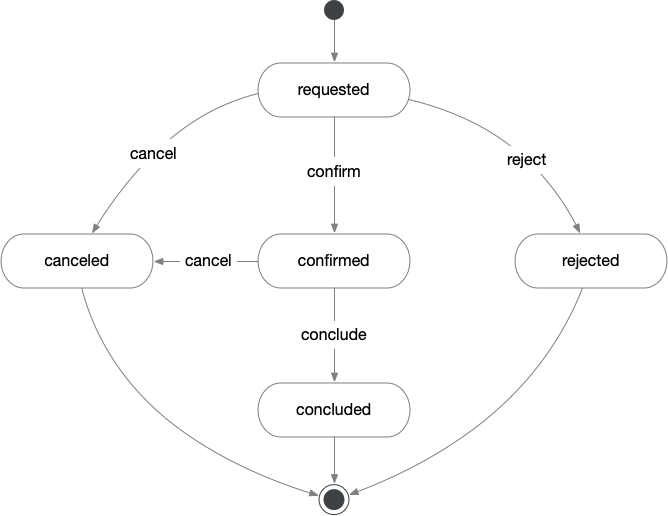
- confirm a Rental can be confirmed only from the state
requested - reject a Rental can be rejected only from the state
requested - conclude a Rental can be concluded (marked as finished) only from the state
confirmed - cancel a Rental can be canceled from the state
requestedorconfirmed
Entity State Engine
transition
We can express this business logic around allowed state transitions by adding a stateEngine configuration to the entity with any of our transitions as a transition.
entity:
  Rental:
    assocTo: Car
    assocToMany: Driver
    attributes:
      state: RentalState!
      from: Date!
      till: Date!

    stateEngine:
      stateAttribute: state # default "state"
      initial: requested

      transition:
        confirm:
          from: requested
          to: confirmed

        reject:
          from: requested
          to: rejected

        cancel:
          from:
            - requested
            - confirmed
          to: canceled

        conclude:
          from: confirmed
          to: concluded
This would
- make the
stateattribute readOnly - it can only be manipulated through dedicatedstateEnginemutations. - add the
initialvalue asdefaultValueto thestateattribute - add a
rentalStatusUpdatemutation which allows to apply any of thetransitionswith a validation if the transition is allowed from the current state. - add
rentalStatusquery which returns the currentstatevalue for aRentalitem and all allowed mutations
If we create a new Rental through the createRental mutation we should get the state value requested since we configured this to be the initial value.
mutation {
  createRental( rental: {
    carId: "111"
    driverIds: ["222", "223"]
    from: "2023-12-01"
    till: "2023-12-03" } )
  {
    rental { id state }
  }
}
{
rental: { id: "300", state: "requested" }
}Since we no longer can modify the state through the standard updateRental we make use of the rentalStatusUpdate mutation. It takes two parameters, the id of a Rental and a RentalStatusTransition. Let's apply the confirm transition for our recently created Rental.
mutation {
  rentalStateUpdate( id: "300" transition: confirm )
  {
    state
    validationViolations
    allowed
  }
}
{
state: 'confirmed',
validationViolations: [],
allowed: [
"rentalStateUpdate( id: '300' transition: cancel )",
"rentalStateUpdate( id: '300' transition: conclude )"
]
}As you see the state change was successful. We get the new state value in the response. If something would have prevented the transition we would see a ValidationViolation but it is empty here.
You might have noticed the allowed list in the response. This gives us any allowed mutation call based on the current state value.
Let's try to apply the confirm transition once more. We should expect some kind of error, since confirm is not allowed from the state confirmed.
mutation {
  rentalStatusUpdate( id: "300" transition: confirm )
  {
    state
    validationViolations
    allowed
  }
}
{
state: 'confirmed',
validationViolations: [{ message:
"not allowed from state:confirmed for 'Rental:300'"
}],
allowed: [
"rentalStateUpdate( id: '300' transition: cancel )",
"rentalStateUpdate( id: '300' transition: conclude )"
]
}As expected we get a ValidationViolation that informs us about the unallowed transition.
Validation
So far we defined a transition simply as state change from one value to another. But sometimes such a state change should only happen, when certain conditions are met. For this we can guard a transition with a validation.
In our example we assume the following business requirement:
A
Rentalcan only be confirmed when there are at least 2 but no more than 4 drivers are assigned theRental.
We add the validation logic to the transition. We are using a simple FEEL Expression for that. More complex logic can be also expressed via a Decision Table or in a code callback.
For simplicity this shows only the relevant part of the DomainConfiguration.
entity:
  Rental:
    stateEngine:
      transition:
        confirm:
          from: requested
          to: confirmed
          validation:
            expression: if count(rental.driverIds) in [2..4] then true else "must be 2 - 4 drivers"
As with any other validation, if the expression returns anything else but true or undefined it is treated as a ValidationViolation. Let's see what happens when we create a rental with just one driver and try to confirm it.
Failed Validation keeps the current state
mutation {
  createRental( rental: {
    carId: "111"
    driverIds: ["222"]
    from: "2023-12-01"
    till: "2023-12-03" } )
  {
    rental { id state }
  }
}
{
rental: { id: "301", state: "requested" }
}Status requested as expected.
mutation {
  rentalStateUpdate( id: "301" transition: confirm )
  {
    state
    validationViolations
    allowed
  }
}
{
state: 'requested',
validationViolations: [{
message: 'must be 2 - 4 drivers'
}],
allowed: [
"rentalStateUpdate( id: '301' transition: confirm )",
"rentalStateUpdate( id: '301' transition: reject )",
"rentalStateUpdate( id: '301' transition: cancel )"
]
}As you see the state did not change and we got the ValidationViolation telling us about the failed condition.
Failed Validation changes state
Instead of keeping the state when a validation fails you might want to have a different transition. Let's say in our example we want to set the state to rejected when the confirm transition is allowed but not valid. We achieve that by adding a failed value that is applied when the validation fails.
entity:
  Rental:
    stateEngine:
      transition:
        confirm:
          from: requested
          to: confirmed
          failed: rejected
          validation:
            expression: if count(rental.driverIds) in [2..4] then true else "must be 2 - 4 drivers"
mutation {
rentalStateUpdate( id: "301" transition: confirm )
{
state
validationViolations
allowed
}
}{
state: 'rejected',
validationViolations: [{
message: 'must be 2 - 4 drivers'
}],
allowed: []
}You see that the state is now rejected and also no more mutations are allowed.
Whether you let a state untouched or change it to a failed value depends on your business requirements.
Observe mutations
You might have realized that there is a flaw in our current configuration. While we cannot confirm a Rental that does not meet the conditions (2 - 4 drivers) an API client could create a valid Rental and confirm it. After that the client could call the updateRental mutation and change the Rental to have just 1 driver. This would be allowed but results in an unwanted situation.
To prevent this we can add any mutation that is affected by or would affect our state to the observe elements of the stateEngine configuration.
entity:
  Rental:
    stateEngine:
      transition:
        confirm:
          from: requested
          to: confirmed
          validation:
            expression: if count(rental.driverIds) in [2..4] then true else "must be 2 - 4 drivers"

      observe:
        - mutation:
            - updateRental
            - deleteRental
          from:
            - requested
            - deleted
With this we set the updateRental and deleteRental mutations under the observation of out StateEngine. In this case we only allow the execution of these mutations when the state is requested or rejected.
If we now try to update or delete a Rental with state value confirmed ...
mutation {
  updateRental( rental: { id: "304" driverIds: ["222"] } )
  {
    rental { state }
    validationViolations
  }
}
{
rental: null,
validationViolations: [{
message:
"not allowed from state:confirmed for 'Rental:304'"
}]
}mutation {
deleteRental( id: "304" )
{
validationViolations
}
}{
validationViolations: [{
message:
"not allowed from state:confirmed for 'Rental:304'"
}]
}... we see, the updateRental and deleteRental mutations return a validationViolation stating that it is not allowed to be called when the state is confirmed.
Associated entities in context
Let's take this thought a bit further. Let's extend the business requirement
A
Rentalcan only be confirmed when acarand 2 to 4driversare assigned and everydriverhas afirstnameand alastname
Take a moment to consider this. When you take a look at our Driver entity configuration you see that a Driver without a firstname would be a valid entity item and we have no reason to change that. When a Driver is assigned to a Rental however, the Rental's possible state transition are dependent on the fact whether a Driver meets certain conditions or not.
From this follows we need to consider any associated entity when validating the Rental's transitions. When we take a look at our current configuration you might now ask, what the context was that our validation expression uses. By default it is only the item of the StateEngine's entity. But now the context must also include some of the associated entities. Let's add context configuration to the stateEngine that has that.
entity:
  Rental:
    stateEngine:
      initial: requested
      transition:
        confirm:
          from: requested
          to: confirmed
          validation:
            expression: >
              count(rental.drivers) in [2..4] and
              count(filter(rental.drivers, "firstname")) = count(rental.drivers)

        reject:
          from: requested
          to: rejected

        cancel:
          from:
            - requested
            - confirmed
          to: canceled

        conclude:
          from: confirmed
          to: concluded

      context:
        assoc: drivers
As you might see we stated in the context the foreignKey of the rental item just as we would in a query. We can now use the variable value in our expressions or decision tables. You can add as many associations also nested as deep as necessary, please refer to the documentation for more.
Variables in context
We validate again with a FEEL expression using the filter expression that filters a list for all items that contain a certain attribute. The expression starts getting complicated and we also may want to use the same expression at other places.
For this we can add variables to the context that we can use in our observers.
entity:
  Rental:
    stateEngine:
      transition:
        confirm:
          from: requested
          to: confirmed
          validation:
            expression: if driversValid then true else "must have 2-4 Drivers, all with firstname"

      context:
        assoc: drivers
        variable:
          - nrOfDrivers:
              expression: count( rental.driverIds )
            nrOfDriversWithFirstname:
              expression: count(filter(rental.drivers, "firstname"))
          - allDriversHaveFirstname:
              expression: nrOfDrivers = nrOfDriversWithFirstname
          - driversValid:
              expression: nrOfDrivers in [2..4] and allDriversHaveFirstname
Note how we added some variables in the context. We ordered them in a list since we use some of the earlier defined in the later expressions. We can use any variable in the validation as demonstrated here.
Observe associated entities
When relying on associated entities for deciding about transitions we're facing the same problem we had with updating or deleting the state entity itself. In our example an API client could update a Driver item that is referenced from a Rental with the state confirmed in a way that it would prevent that state.
Even when not relevant for validations there might be a business requirement that prohibits changing of associated entity items to a state entity when the latter is in a certain state.
To make sure this does not happen we can add the regarded mutations to our observe list and write the state values in which a referenced Rental item must be in order to allow updating or deleting a Driver.
entity:
  Rental:
    stateEngine:
      observe:
        - entity: Driver
          from:
            - requested
            - rejected
            - canceled
            - concluded
When a Rental has the state value confirmed it should not allow any update or delete of an associated Driver. Let's see what happens when we try to update the Driver of the Rental that is in the state confirmed.
mutation {
  updateDriver( driver: { id: "222" firstname: "Maxime" } )
  {
    driver { firstname lastname }
    validationViolations
  }
}
{
driver: null,
validationViolations: [{
message:
"not allowed from state:confirmed for 'Rental:304'"
}]
}As expected the updateDriver mutation does not execute but returns with a ValidationViolation that informs us about the Rental state preventing it.
Status change at observed mutations
So far we've seen how to apply a transition via the rentalStatusUpdate mutation which is basically the implementation of a finite state machine. There may be business requirements though where you want to change the state of an entity item after updating it or after the create, update or delete of an associated entity item.
Let's assume we want to allow deleting the associated Car item of a Rental but that should lead to in an immediate cancel of the Rental itself. We can achieve this by adding the deleteCar to the observe mutations and configuring a state value the Rental should have after the execution of this mutation.
entity:
  Rental:
    stateEngine:
      observe:
        - mutation: deleteCar
          from:
            - requested
            - rejected
            - canceled
            - confirmed
            - concluded
          to: canceled
When we now delete the Car item that is associated to the confirmed Rental ...
mutation{ deleteCar( id: "111") { id validationViolations } }... and look at the state for the Rental ...
query {
  rentalState(id: "304" ) {
    state
  }
}
{
state: "canceled"
}... we see the Rental has the state value canceled.
Dynamic state values
So far we uses static values to determine which state the Rental should have after a transition or observed mutation.
In some cases you might need more flexibility to decide into which state a StateEntity should change after a mutation execution. You can simply achieve that by using a variable name instead of a StatusEnum value for the to and failed values.
Let's assume the following the following requirement:
In the case a validation of the
confirmtransition fails, thestateshould either change torejectedwhen the Principal of the mutation has the roleadminor - in any other case - thestateshould be kept the same.
Please note how we no longer use one of the enum values from the RentalState enum as to in the confirm transition but instead a variable name which is resolved in the context.
entity:
  Rental:
    stateEngine:
      transition:
        confirm:
          from: requested
          to: confirmOrReject

      context:
        assoc: drivers
        variable:
          - nrOfDrivers:
              expression: count( rental.driverIds )
            nrOfDriversWithFirstname:
              expression: count(filter(rental.drivers, "firstname"))
          - allDriversHaveFirstname:
              expression: nrOfDrivers = nrOfDriversWithFirstname
          - rentalValid:
              expression: nrOfDrivers in [2..4] and allDriversHaveFirstname
          - isAdmin:
              expression: if includes( @principal.roles, "admin") then true else false

          - confirmOrReject:
              input:  [ 'rentalValid',  'isAdmin' ]
              output:                               state
              rules:
                -     [ 'true',         '-',        '"confirmed"' ]
                -     [ 'false',        'true',     '"rejected"'  ]
                -     [ '-',            '-',        ''            ]
We use an expression to resolve a variable isAdmin in which we check for the "admin" role in the principal (which is always present in the context when it is present in the API request). This variable, together with rentalValid is used as input of a Decision Table in which we determine the actual value for the new state.
The logic / Decision Table rules can be read as
- when the
rentalValueistruethe output of the Decision table (newstate) should beconfirmed - when the
rentalValueisfalseand the principal is an admin the newstateshould berejected - in any other case (not
rentalValidand notisAdmin) the output of the Decision table should beundefined- which means thestatevalue does not change
Let's assume there is no principal in the API call or a principal without the "admin" role, trying to confim a Rental with the state requested and not confirmable would result in simply leaving requested
mutation {
  rentalStateUpdate( id: "304" transition: confirm )
  {
    state
    validationViolations
  }
}
{
state: 'requested',
validationViolations: [],
}When there is principal with the role "admin" present in the API call though we should expect the new state value to be rejected
# API request has a principal with { roles: ["admin"]}
mutation {
  rentalStateUpdate( id: "304" transition: confirm )
  {
    state
    validationViolations
  }
}
{
state: 'rejected',
validationViolations: [],
}