Server & Runtime Setup
While the demo/server uses an example setup to make the start seamless, you can customize your server installation in many ways as described here.
Server Start Script
When you run npm run server you execute the /bin/activeql.ts script that basically just creates an ActiveQLServer instance with a ActiveQLServerConfig and starts it.
import { ActiveQLServer } from 'activeql-foundation';
import { runtimeConfig } from './runtime';

(async () => {
  const activeql = await ActiveQLServer.create({ runtimeConfig });
  activeql.start();
})();
ActiveQLServerConfig
You create the ActiveQLServer with an ActiveQLServerConfig holding the RuntimeConfig. Besides that you can influence the behavior of the server with the following parameters.
You can also set the values as environment variables. E.g. the following command would let the server listen on port 4001 (instead of 4000).
export ACTIVEQL_PORT=4001; npm run serverConfig values from the ActiveQLServerConfig will have always precedence, though.
| Config | Type | Environment Variable | Default | Description |
|---|---|---|---|---|
| runtimeConfig | RuntimeConfig | configuration of the Runtime | ||
| graphql | boolean | ACTIVEQL_GRAPHQL | true | GraphQL endpoint enabled/disabled |
| subscriptions | boolean | ACTIVEQL_SUBSCRIPTIONS | true | Subscriptions enabled/disabled |
| rest | boolean | ACTIVEQL_REST | true | REST endpoint enabled/disabled |
| scheduler | boolean` | ACTIVEQL_SCHEDULER | true | Scheduler enabled/disabled |
| graphqlPath | String | ACTIVEQL_GRAPHQL_PATH | /graphql | GraphQL endpoint path |
| restPath | String | ACTIVEQL_REST_PATH | /rest | REST endpoint root path |
| port | string|number | ACTIVEQL_PORT | 4000 | http server port |
| openApi | OpenApInfoObject | Configuration for the OpenAPI schema (opens in a new tab) | ||
| beforeExpressAppInit | (app:Express) => Express | Promise<Express> | Callback before the Express app is initialized, to execute custom code | ||
| afterExpressAppInit | (app:Express) => Express | Promise<Express> | Callback after the Express app is initialized, to execute custom code |
RuntimeConfig
This RuntimeConfig defines your Runtime as follows:
| Config | Type | Default | Description |
|---|---|---|---|
| domainGraph | DomainGraph | a DomainGraph from Domain Configuration usually built by the DomainGraphBuilder | |
| name | string | ActiveQL | Name of this Runtime - used for logging/debugging |
| environment | RuntimeEnvironment | development | the Runtime environment |
| dataStore | () => Promise<DataStore> | NeDB Datastore implementation | factory method for the Datastore implementation |
| fileHandler | () => Promise<FileHandler> | ReferenceFileHandler | factory method for the FileHandler implementation |
| beforeInit | (runtime:Runtime) => void | callback to be executed before the Runtime is initialized | |
| afterInit | (runtime:Runtime) => void | callback to be executed after the Runtime is initialized | |
| localeFn | (req:IncomingMessage) => string | () => 'en' | callback to determine the locale that is set in the GraphQL context object. You have access to the http request and could use this (e.g. Cookie) to resolve the locale. |
| addNonProductionType | (environment, name) => boolean | true for all, unless in environment 'production' | whether the internal (mostly) test types should be added to the API |
Besides these configuration options you could add factory methods for the implementation of core ActiveQL core features. Which we cover in Implementing ActiveQL
Runtime Environment
The environment option can take the following values:
| Value | Description |
|---|---|
| development | only in this environment the Schema includes the seed mutation you can use to seed data into the DataStore |
| test | you can use this environment when running automated tests |
| stage | you can use this environment when testing your API in a near-production environment |
| production | this should be the environment when running your API in production |
DomainGraphBuilder
The DomainGraph is the sum of all Domain Configuration that describes your business domain. A typical implementation is to have a ./runtime/runtime-configuration.ts file that uses a DomainGraphBuilder to load config files from a folder and resolve these into a DomainGraph.
import { DomainGraphBuilder, RuntimeConfig } from 'activeql-foundation';
import { domainConfiguration } from './domain-configuration';

const domainGraphBuilder = new DomainGraphBuilder(__dirname + '/domain-configuration');
domainGraphBuilder.add(domainConfiguration);

export const runtimeConfig: RuntimeConfig = {
  domainGraph: domainGraphBuilder.getDomainGraph()
};
In this example the DomainGraph is build from
- the content of the config files in the folder
./runtime/domain-configurationand - the exported
DomainConfigurationobject in./runtime/domain-configuration.ts
With this setup it would sufficient to place any ActiveQL domain-configuration files inside the ./runtime/domain-configuration folder (or any sub-folder) or add any configuration into the DomainConfiguration object.
You can however organize this differently for your needs. If you want to separate let's say seed configuration from entity configuration, you could have these in different folders and according to an environment variable or something else decide whether to add a folder to the DomainGraphBuilder or not. You can also have different DomainConfiguration objects merged into the graph.
You can add as many folders paths (string) or DomainConfiguration objects as you like. They will be merged into one DomainGraph.
import { DomainGraphBuilder, RuntimeConfig } from 'activeql-foundation';
import { domainConfiguration } from './domain-configuration';

const domainGraphBuilder = new DomainGraphBuilder();
domainGraphBuilder.add(__dirname + '/domain-configuration/domain');
if( env.ACTIVEQLENVIRONMENT != 'production' ){
  domainGraphBuilder.add(__dirname + '/domain-configuration/seed');
}

export const runtimeConfig: RuntimeConfig = {
  domainGraph: domainGraphBuilder.getDomainGraph()
};
beforeInit / afterInit Callback
The beforeInit and afterInit callbacks allow you to execute custom code during runtime initialization. These are useful for:
- Setting up custom services
- Registering custom schema extensions
- Initializing external connections
- Custom seeding or data migration
Example:
export const runtimeConfig: RuntimeConfig = {
  domainGraph: domainGraphBuilder.getDomainGraph(),
  beforeInit: async (runtime: Runtime) => {
    console.log('Runtime initializing...');
    // Setup custom services, register extensions, etc.
  },
  afterInit: async (runtime: Runtime) => {
    console.log('Runtime initialized!');
    // Access initialized entities, perform post-init tasks
  }
};
Server Configuration and Startup
The following gives an overview about the setup and startup of an ActiveQL Server.
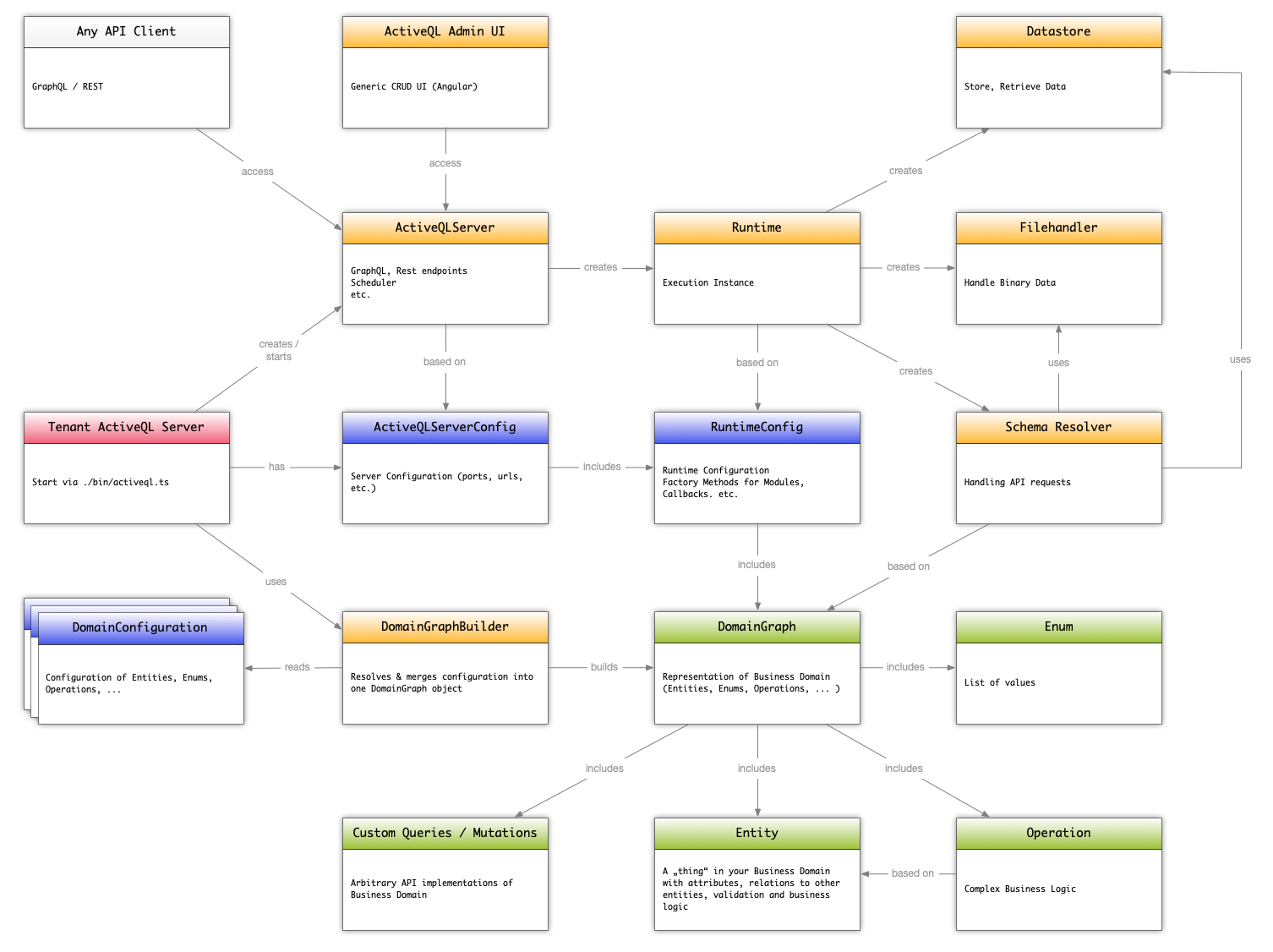
- creation a
DomainGraphBuilderand adding folder with config-files and/orDomainConfigurationobject(s) toDomainGraphBuilder - creation of a
RuntimeConfigwithDomainGraphfromDomainGraphBuilder - adding factory methods and config parameters to
RuntimeConfig(optional) - creation an
ActiveQLServerConfigwith theRuntimeConfig - adding config parameters to
ActiveQLServerConfig(optional) - creation an
ActiveQLServerinstance with theActiveQLServerConfig - creation of a
Runtimeinstance withRuntimeConfig - initialization of
Runtime(incl. calling pre/after hooks)- creation of
SchemaBuilder(entity, enum, ... ) - creation of
Entityinstances - creation of GraphQL Schema
- calling factory methods for
DataStoreandFileHandler - initialization of all created instances
- creation of
- starting the
ActiveQLServerinstance (incl. calling pre/after hooks)- preparing the ExpressJS http server and app
- starting the ExpressJS http server
- starting the scheduler
Server with multiple Runtimes
You could have many Runtime Configurations in your server package. The following example shows how you could use a command line parameter to decide which runtime the ActiveQL server should use:
import { ActiveQLServer, RuntimeConfig } from 'activeql-foundation';
import { generateUml } from './uml';

const loadRuntimeConfig = async (runtime:string) => {
  const runtimeFolder = `${__dirname}/../${runtime}`;
  const rtImport = await import(`${runtimeFolder}/runtime-configuration`);
  const runtimeConfig = rtImport.runtimeConfiguration as RuntimeConfig;
  runtimeConfig.name = runtimeFolder;
  return runtimeConfig;
}

const getRuntime = () => process.argv.length >= 3 ? process.argv[2] : 'runtime';

(async () => {
  const runtime = getRuntime();
  const runtimeConfig = await loadRuntimeConfig( runtime );
  const activeql = await ActiveQLServer.create({ runtimeConfig });
  activeql.start();
})();
With this you can state when starting the server
npm run server playgroundWhich would try to import a RuntimeConfig from the file ./playground/runtime-configuration.ts
Structure your configuration
If you have a non-trivial domain definition, you can split your configuration, even the same entity definition between any number of YAML or object configurations. Let's say you want to separate the seed data (see Seeds-Configuration) from the configuration of the attributes - thus making it easy to in-/exclude the seeds-configuration from the domain configuration, or even have separate seed-configurations. Let's further assume you prefer writing your entity configurations in YAML but need one of the function callbacks only available in object notation.
We recommend the following pattern:
- one configuration folder for your domain definition
- named after your business domain, e.g.
./cars-managementor generic./domain-configuration. - one YAML file per entity or enum in this folder with the file-name of the dasherized filename, e.g. entity
VehicleFleetconfiguration is in file./vehicle-fleet.yml.
- named after your business domain, e.g.
- one folder per set of seed-data if you want to separate the seed-data / configuration from the
entity configuration
- folder named after your business domain, e.g.
./cars-management-seedsor generic./seeds - files named exactly as the file with the rest of the entity definition
- folder named after your business domain, e.g.
- one src folder for the configuration-object definitions
- named after your business domain, e.g.
./cars-managemnt-src - one file per use-case
- named after your business domain, e.g.