Attribute Configuration
Entities have attributes describing the data of the entity. You can define its aspects by the this configuration type, in YAML, JSON or a configuration object. In the following examples we will prefer YAML and use a configuration object only when necessary.
Configuration Type
| parameter | type | purpose |
|---|---|---|
| type | string | type of attribute values, can be any GraphQL or ActiveQL scalar or any of your defined enums |
| required | boolean | mandatory attribute value; adds schema and business validations for non-null values |
| unique | boolean | uniqueness of value; adds business validation for unique values, also within a scope |
| pattern | string | adds business validation to check if the value matches this pattern |
| list | boolean | list of scalar types |
| defaultValue | any or Function | static or dynamic default values for new entity items |
| filterType | string or boolean | disable or change filter behavior for attributes |
| description | string | adding documentation to the public API / schema |
| validation | object | configure business validation using extensive ValidateJS syntax |
| resolve | Function | callback to determine custom value for a field that will be send to a client |
| virtual | boolean | non-persistent value; value is never written or read from datastore |
| objectType | boolean | should this attribute be part of the type itself (or only mutations) |
| mediatype | string | only used as metadata for UI clients, e.g. ActiveQL Admin UI |
| sequence | number | any number > 0 will be used as a start for a sequence, any next item will get the next sequence value |
Shortcut Notation
Instead of providing the configuration object you can skip everything and just write the type as value for the attribute instead. The rest of the attribute configuration object would then be set as default. You can even use all type shortcut notations (such as String! or Key as described below) when using this. The following examples are equivalent:
| Shortcut | More explicit notation |
| |
type
| Config | Description |
|---|---|
string | ActiveQL will
|
string[] | any list of strings will be resolved into an Enum |
While technically possible you should not use an Entity type as a type for an attribute but instead describe the relationship between entities as associations.
Type Shortcuts
The most common attribute configurations can be done by via shortcut notation:
| Value | Description |
|---|---|
Key | sets the type to String, required and unique to true |
^pattern$ | sets the type to String and the pattern to pattern |
typeName! | sets the type to 'typeName' and required to true, e.g. Int! becomes { type: 'Int, required: true}; works with other shortcuts too |
[typeName] or typename[] | sets type to 'typeName' and list to true, e.g. Int! becomes { type: 'Int, list: true } |
url | sets type to String and a pattern validation to a valid URL |
Int+ | Float+ | adds a validation numbers greater than 0 |
Int- | Float- | adds a validation numbers lesser than 0 |
Float.n | adds a decimal of n places to the Float attribute |
string[] | if the type definition is list of strings, an enum will be created and the type of the attribute will be of this enum |
GraphQL scalar type
You can use any GraphQL scalar type. Check also GraphQL Type System (opens in a new tab)
| Value | Description |
|---|---|
| Int | A signed 32-bit integer. |
| Float | A signed double-precision floating-point value. |
| String | A UTF-8 character sequence. |
| Boolean | true or false |
| String | A UTF-8 character sequence. |
| ID | represents a unique identifier, Although allowed it is advised not to use the ID type since ActiveQL uses this to identify entity items and establish relations between entities (think primary and foreign keys). |
ActiveQL scalar types
In addition to the GraphQL scalar types, ActiveQL provides the following types, that can be used as a type for an attribute.
| Value | Description |
|---|---|
| DateTime | String representation of a Date in the JSON data it serializes to/from new Date().toJSON() internally it converts it to a Javascript Date object |
| Date | String representation of a Date in simplified format yyyy-mm-dd; this type does not know about any timezones, it is merely a structured string, nonetheless sufficient in many situation when you don't care about timezones or complex date calculations. If you do, use DateTime instead. |
| JSON | arbitrary JSON structure (you should use this with caution and prefer GraphQL types instead); this is also the fallback type when a type cannot be determined to keep a configuration executable |
Enum
An attribute with an enum type (either an enum from configuration, schema or inline) will become a GraphQL enum, meaning the GraphQL layer will only accept requests and responses with values of this enum.
| Value | Description |
|---|---|
| enumName | will take this (enum) if exists as type for this attribute |
| List of values | will create an enum on the fly in the graph |
Instead of an Enum name you can also simply state a list of values. An Enum will be created on the fly. So the following configuration would result in the same graph.
| |
required
| Value | Shortcut | Description |
|---|---|---|
false | if not provided | no effect |
true | attributeName! | NonNull in entity object and create input type, required added to validation |
Non-Null Field in Schema
If you set the required modifier for an attribute to true, the corresponding field of the following types become a NonNull field in the GraphQL schema:
- the entity object type
- the input type for the create mutation
This means a client not providing a value for this field in a create mutation would result in a GraphQL error. Since the "required-requirement" is part of the public API you can expect any client to handle this correctly. If you prefer to send ValidationMessages (instead of throwing an error) when a client sends null-values for required fields in a create mutation, you can leave the required option to undefined or false and use an attribute validation instead.
Please be aware there will also be an error thrown by the GraphQL layer if a resolver does not provide a non-null value for a required attribute. As long as the data are only handled by the default mutations or the EntiyAccessor, this should never happen. But it could be the case if the data in the datastore are manipulated directly by a custom query or mutation or external source.
Attribute Validation
In addition to the non-null schema field a required validation is added to the validation of any required attribute. You might ask why, since the GraphQL layer would prevent any non-null value anyhow. This is only true for the create mutation. The input type for the update mutation allows a client to only send the attributes that should be updated. So even the field for a required attribute in the update input type allows a null-value - to leave it untouched. But now a client could erroneous send something like {brand: null} even if "brand" is a required attribute.
In addition to this any custom mutation could (and should) use an entity to create or update entity items. These values are not "checked" by the GraphQL schema of course. Therefore before saving an entity item, all validations - incl. this required - validation must be met.
Meta Data
The information will also be part of the MetaData and can therefore used by any UI client. E.g. the ActiveQL Admin UI uses this information to render a mandatory input field for this attribute.
Example
| YAML | Resulting Schema (excerpt) |
same as short | |
| Request | Response |
| |
list
list?:boolean| Value | Shortcut | Description |
|---|---|---|
false | (default) | no effect |
true | [attributeName] | type of this attribute is a list of the scalar type |
Setting list to true will set the field for this attribute in the following schema types as a GraphQLList type:
- for the entity object type
- for the input type for the create mutation
- for the input type for the update mutation
- for the input type for the types query filter
Please be aware that your datastore implementation might not be able to handle this or at least makes it harder or impossible to filter or sort these attributes. The default datastore implementations uses a document database and will therefor store arrays in the entity item document quiet easily.
Also note it is only possible to set one required configuration per attribute. If true it is treated as
setting the list values to a NonNull type, but never the list field itself. So you can set the configuration to
[String!] or explicit { type: 'String', required: true, list: true } and the resulting field type
of the expected GraphQL type [String!]. But you cannot express a configuration that would lead to a schema field type
of [String]! or [String!]!. In other words: list scalar fields are never required.
Example
| YAML Configuration | Schema (excerpt) |
same as short | |
As you see the regular filter and sort types are used. Also please note that the repairsAtKm field for the update
type is a NonNull type. This is a client can decide to not provide a list for an update - the current values would
be left untouched. But when a list is updated is must meet the required configuration.
You can filter List scalar the same way you would filter a regular field, instead it uses any entry in the list to match against the filter. The same goes for sorting. Whey you sort after a list attribute the max/min, first/last entry is used (depending on the type) to find the sorted position of an entity item.
If you need more control over how you want to filter or handle these kind of data we strongly suggest to model these as separate entities with associations with each other.
decimal & decimalPolicy
Float values can have an arbitrary number of decimal places. You can how many you want to accept for a certain attribute.
decimal?:number
decimalPolicy?:'reject'|'round'decimal | Description |
|---|---|
Float values are kept how they wer sent by a client | |
number | depending on decimalPolicy the Float values are rounded to these number of decimal places |
decimalPolicy | Description |
|---|---|
'round' | Float values are rounded to these number of decimal places |
'reject' | if a Float value has more decimal places than the decimal configuration - a validation violation occurs |
Example
|
|
unique
unique?:boolean|string| Value | Shortcut | Description |
|---|---|---|
| false | (default) | no effect |
| true | adding validation of uniqueness of this attribute to the entity | |
| [other attribute] | adding validation of uniqueness of this attribute to the entity within the scope of this attribute | |
[assocTo Name] | adding validation of uniqueness within the scope of the assoc of this attribute to the entity |
If an attribute is declared as unique, a validation is added to check that no entity item with an equal value for this attribute exists. If it finds the input value not unique it adds a message to the ValidationViolaton return type.
If the attribute is not required - it would allow many null values though.
Example
Let's assume we want to express the requirement that the license number of a car should be unique. We could write
entity:
  Car:
    attributes:
      brand: String!
license:
type: String
unique: true| Request | Response |
Let's see what cars already exist. | One car with the license number "HH-BO 2020" exists. |
If we try to create a 2nd car with the same license ... | ... we would get a validation violation. |
Adding a car with a different license ... | ... passes all validations. |
Scoped attribute unique
Sometimes a value must only be unique in a certain scope. Let' assume we want to make sure that there are no two cars with same color of the same brand.
entity:
  Car:
    brand: String
    color:
      type: String
unique: brand| Request | Response |
Let's see what cars already exist. | There is a red Mercedes. |
Let's try to create another red Mercedes. | Validation does not pass. |
A red BMW though ... | ... is created without objection. |
Scoped assocTo unique
If you have an assocTo relation to another entity - you can also scope the unique to this association, by using the fieldName of the assocTo association (default: the typeQueryName of the associated entity).
Lets assume we have multiple vehicle fleets and a car belong to exactly one vehicle fleet. A car should manually assigned order number to express a rating. This rating should be unique for a fleet, only one car should be on position 1, 2, 3 etc.
Making the attribute "rating" unique would prevent to have independent rating numbers per fleet. So you can scope this unique option to the assocTo relationship.
entity:
  VehicleFleet:
    attributes:
      name: String!
  Car:
    assocTo: VehicleFleet
    attributes:
      license: Key
      brand: String!
      nickname:
        type: String
        required: true
        unique: vehicleFleet
pattern
pattern?:stringYou can add a business validation for strings to match a certain pattern. This validation is independent from the configured validation framework. The pattern must be enclosed in ^ and $.
entity:
  Book:
    attributes:
      title: Key
      isbn:
        pattern: ^(?=(?:\D*\d){10}(?:(?:\D*\d){3})?$)[\d-]+$
Note that regardless of any configured type it will always be string, so it's safe to omit the type.
It is recommended to use the shortcut notation:
entity:
  Book:
    isbn: ^(?=(?:\D*\d){10}(?:(?:\D*\d){3})?$)[\d-]+$
You can also use (only in shortcut) the required identifier !.
entity:
  Book:
    isbn: ^(?=(?:\D*\d){10}(?:(?:\D*\d){3})?$)[\d-]+$!
would be the same as
entity:
  Book:
    isbn:
      pattern: ^(?=(?:\D*\d){10}(?:(?:\D*\d){3})?$)[\d-]+$
      required: true
defaultValue
defaultValue?:any|(( attributes:any, runtime:Runtime)=>any|Promise<any>)| Value | Shortcut | Description |
|---|---|---|
| [empty] | (default) | no effect |
| [any value] | default value when creating a new entity item | |
| [Function] | called to get the default value for a new entity item; can return a value or a Promise |
You can set either a value or a callback function (configuration object only) to determine a default value for an attribute if a client does not provide a value for it. There will be some checks if the value matches the type of the attribute and some sanitizing if possible. But you should be aware of the correct type since it could come to unwanted unwanted casts or errors if it doesn't.
If you provide defaultValue (literal or function) in the configuration, this attribute becomes no longer mandatory in the CreateInputType schema type. Since there will always be a default value the required condition will be met when creating a new items even when a value is not provided by a client.
Default Value Example
Let's assume any new car should have a mileage of 0 and the color white. Notice how the required attribute "mileage" remains a NonNull field in the Car schema type but no longer in the CarCreateInput type.
| YAML Configuration | Schema (excerpt) |
| |
Sometimes we need dynamic default values. Let's say the registration date of a car should be set to today when not provided by a client. We could not add a static value for that - so we use the callback. We do not use the runtime in this implementation - but it could be used to access other entities or access a 3rd party API or anything else. We cant add the callback function in YAML but it is totally ok to have the entity definition in a YAML configuration and only add the specific attribute option in a configuration object.
{
  entity: {
    Car: {
        registration: {
          type: 'Date!',
          defaultValue: (rt:Runtime) => new Date()
        }
      }
    }
  }
}| Request | Response |
| |
| |
filterType
filterType?:string|false| Value | Shortcut | Description |
|---|---|---|
| [empty] | (default) | attribute will be added to the entity filter type if a default filter for the attribute type exists |
false | attribute will not be added to the entity filter type | |
| 'filterName' | attribute will be added to the entity filter type if filter type "filterName" exists |
Usually every attribute will be added to the filter type for the entity, so a client could filter or search for entity items over this attribute's values. This is true with the exception of
FileJSON
For any other attribute it is tried to determine a filter type per convention [TypeName]Filter so e.g. for the field type String a filter type StringFilter is used. These FilterTypes must come from the datastore implementation, since they are in their behavior dependent on how a datastore gathers data.
The default ActiveQL datastore implementations provide the following FilterTypes:
IDFilterTypeStringFilterTypeStringListFilterTypeIntFilterTypeFloatFilterTypeBooleanFilterTypeDateFilterTypeDateTimeFilterType
Also for any Enum type a FilterType is added. So if you have an enum CarBrand the filter type CarBrandFilter will be generated.
If you want to prevent to filter / search for a certain attribute you can set the filter configuration for this attribute to false.
If your datastore implementations offers more or other filter types you can also override the convention by declaring the filter type name here.
For more information how to use filter check out the Filter/Search section in Queries and Mutations.
Filter Type Example
Let's assume we do not want to allow a client to filter cars by their "brand", only by its other attributes ("mileage" or "color"). We will set the filter for "brand" to false. Notice how the "brand" is no longer part of the CarFilter type.
| Object Configuration | Schema (excerpt) |
| |
description
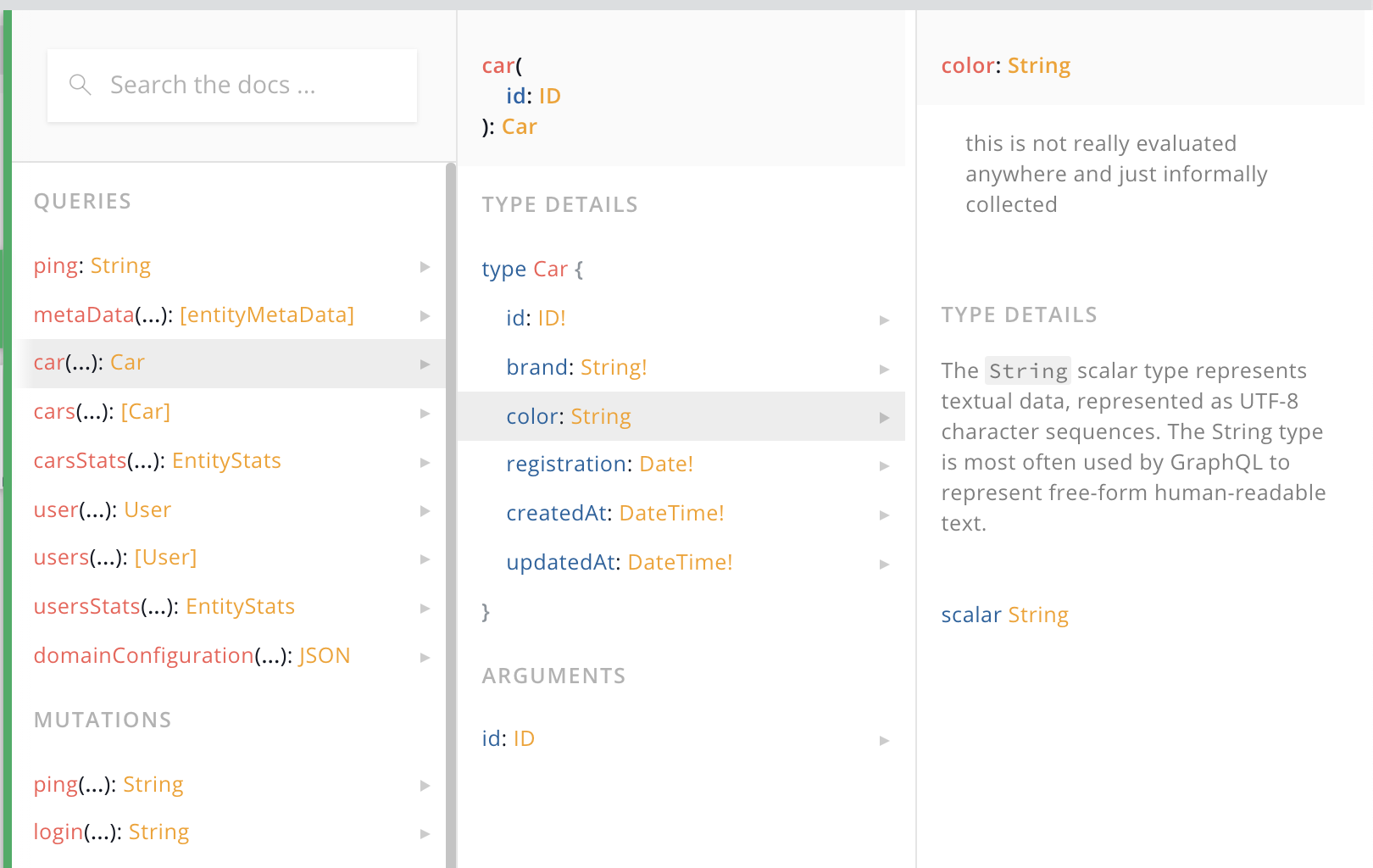
description?:stringYou can add any information / documentation to an attribute that will become part of the schema documentation. In some circumstances ActiveQL adds some description itself (e.g. the validation information) but will always leave your description intact.
Description Example
| YAML Configuration | Schema (excerpt) |
(We use the standard YAML feature of multiline text input here.) | |
Schema Documentation
validation
validation?:object| Value | Shortcut | Description |
|---|---|---|
| [empty] | (default) | no validation will be added (defaults like required are not influenced) |
| object | validation configuration for the current Validator instance, default uses ValidateJS |
Validations take place before saving an entity item. If validation, either any attribute-validation or
entity-validation returns something different then undefined or [] the validation fails and no create or update
happens. The validations create a list of ValidationViolation that informs the client about the failed
validations.
Please notice that these attribute validations are only applied when a potential required validation did not fail
before. This is certainly the case if triggered by a GraphQL request, since the GraphQL layer already correct
non-null values, but also wenn used by any custom code. In other words only non-values values will be
validated.
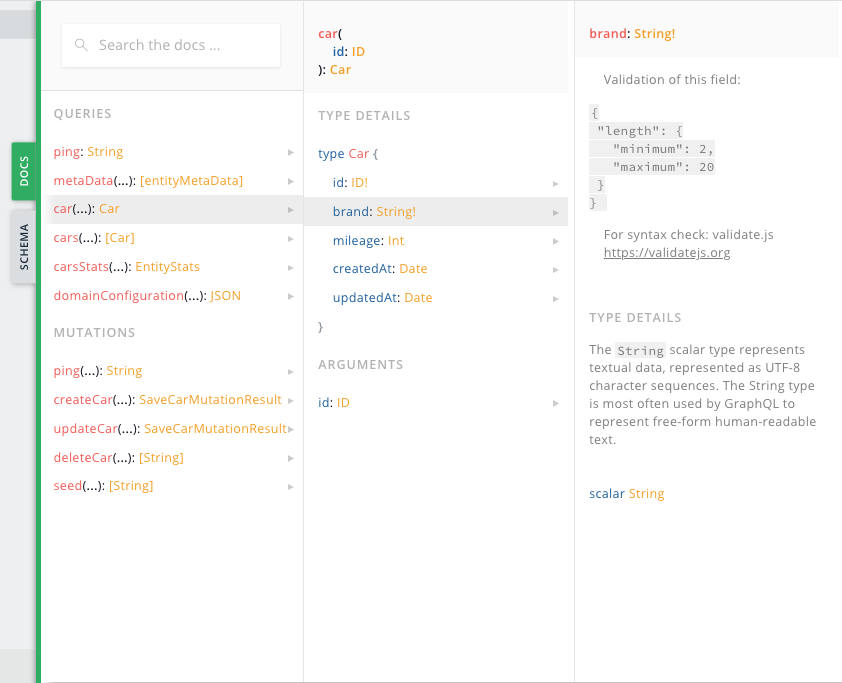
Any validation configuration is added as stringified JSON to the description of an attribute, thus becoming part of your public API documentation. It is also provided as MetaData so any UI client (as the ActiveQL Admin UI) could use this for client-side validation.
ValidateJS
The default EntityValidation uses ValidateJS for configurable validations of attribute values. If you decide to
use another validation library (by providing another EntityValidation implementation) you should use the syntax of
the chosen library then.
For ValidateJS syntax check out their extensive documentation (opens in a new tab).
Validation Function
For non-trivial validations not expressible by configuring ValidateJS validation, you can always implement a callback function on the entity definition and implement any custom validation logic there. See Entity Validation
Attribute Validation Example
Let's assume we want to ensure that the "brand" of a car item as at least 2 and max 20 characters, also the
"mileage" should be a positive number. The "brand" is required, we do not need to add a validation for this,
since the type is already indicating this attribute as required.
The "mileage" is optional though but if provided must match the validation.
| YAML Configuration | Schema Doc Viewer |
We can ValidateJS syntax in yaml. | The stringified JSON is added to the description of the field in the schema.
|
| Request | Response |
If we now try to create car item with invalid values ... | ... we get the ValidationViolations and no car item was created. |
resolve
resolve?:(arc:AttributeResolveContext) => any

export type AttributeResolveContext = {
  item:any
  resolverParams:ResolverParams
  runtime:Runtime
  principal:PrincipalType
}
Any attribute resolve function is called on every entity item before it is delivered to an API client. Any value returned by the resolve functions becomes the attribute value in the entity item in the following results
typeQuerytypesQuery- return of create mutation
- return of update mutation
- embedded items for
assocTo,assocToManyandassocFromrelationships
You get (amongst others) the item as it comes from the datastore in the AttributeResolveContext argument.
attribute Resolve Example
Let's assume you want to deliver the "brand" of a car always in upper letters, regardless how it is stored in the datastore.
{
  entity: {
    Car: {
      attributes: {
        brand: {
          type: 'String!',
          resolve: ({item}) => _.toUpper( item.brand )
        }
      }
    }
  }
}| Request | Response |
| |
virtual
virtual?:boolean| Value | Shortcut | Description |
|---|---|---|
false | (default) | attribute is persisted in datastore |
true | attribute is not persisted in datastore |
Usually any attribute will be persisted in the datastore when saved by a create or update mutation. You could decide that an entity item should have an attribute value that is not simply a value from the datastore but should be resolved otherwise. If an attribute has virtual: true - this attribute will only be included in the entity type and not the input types, filter or sort type.
These are the possible ways to resolve a virtual attribute:
resolvefunction of the attribute itselfafterTypeQueryandafterTypesQueryhook
Virtual Attribute Example
Let's assume we know the year of manufacturing of a car and want to provide the age of the car as part of the car item. The "age" attribute should not provided by an API client, nor stored in the datastore but calculated every time a car item is delivered for a query.
Since "age" is a virtual attribute is not a field in the input, filter or sort types.
{
  entity: {
    Car: {
      attributes: {
        brand: 'String!',
        manufacturedYear: 'Int!',
        age: {
          type: 'Int!',
          virtual: true,
          resolve: ({item}) => new Date().getFullYear() - item.manufacturedYear
        }
      }
    }
  }
}| Request | Response |
| |